Intended workflow: separate design from manufacture
Dentsply Sirona’s CEREC page separates scanning, design, manufacture and finalization. It presents local CEREC Software and browser-based CEREC on DS Core; the cloud design scope names crowns, inlays and onlays. The page also describes CEREC Software 5.3 connected with DS Core and notes paid subscription requirements. Product-page scope is not proof of the practice’s installed entitlement.
For local production, the practice must establish its exact indication, equipment/material workflow and responsible finalization steps. For lab fabrication, define the required records and destination instead. No general software description establishes a clinical setting or production approval.
In-house versus outsourced: compare the actual task
| Route | Who owns the work | First evidence to request |
|---|---|---|
| Local CEREC Software | Practice design and its chosen production/review team. | Installed release, supported task, licensed functions and validated production instructions. |
| CEREC on DS Core | Practice uses the browser design workflow; manufacturing remains a separate responsibility. | Account/region, active feature entitlement and intended device/material route. |
| Outside lab receives acquisition records | Receiver designs or fabricates the agreed work from available records. | Named registered receiver where DS Core is used, record completeness and receiving CAD acceptance. |
| Outside designer returns a design for local manufacture | Designer produces the agreed output; receiving team checks and releases it. | Test both outbound records and the returned output in the exact receiving workflow. This is not an established Pristine CEREC integration. |
Hypothetical practice: it wants help with posterior design while retaining manufacture. First test whether the outside designer can receive the required preparation, opposing and relationship records. Then separately test the returned output against the practice’s actual production route. If only lab fabrication is available, that is a different service decision, not a failed CAD shortcut.
Scan downloads are not the same as design exports
The current US DS Core lab page describes downloadable scans in DXD, PLY, STL and exocad formats. The practice-page subscription table lists “CEREC Design STL export” under Advanced. These are different documented scopes: do not assume every account, case or subscription exposes both. The practice page also says a lab must be registered in DS Core and available for the region.
A named file format does not establish which records a particular case contains, editable native history or downstream manufacture. Ask the receiver to identify the file’s role. Use the existing surface-versus-project guide for format context, and DS Core handoff guide for regional/account route investigation.
| Evidence | What it answers | What it leaves open |
|---|---|---|
| Acquisition record download | Can the receiver obtain the named scan roles and instructions? | Whether an editable CEREC project or completed restoration design is included. |
| CEREC design STL export entitlement | Does this account expose the required design export for this task? | Whether a third-party design can be imported or manufactured in reverse. |
| Native continuation requirement | Can the receiving release open and continue the agreed project state? | A generic platform format list is not a tested sender/receiver pair. |
| Returned design trial | Does the responsible receiver accept the exact returned output for its next step? | Clinical/production release and material/device validation remain separate. |
Keep an immutable copy of the source package and record the exact account, product/release, date and observed result. Do not reuse legacy portal instructions without checking the current route.
Where Pristine can help and what the portfolio establishes
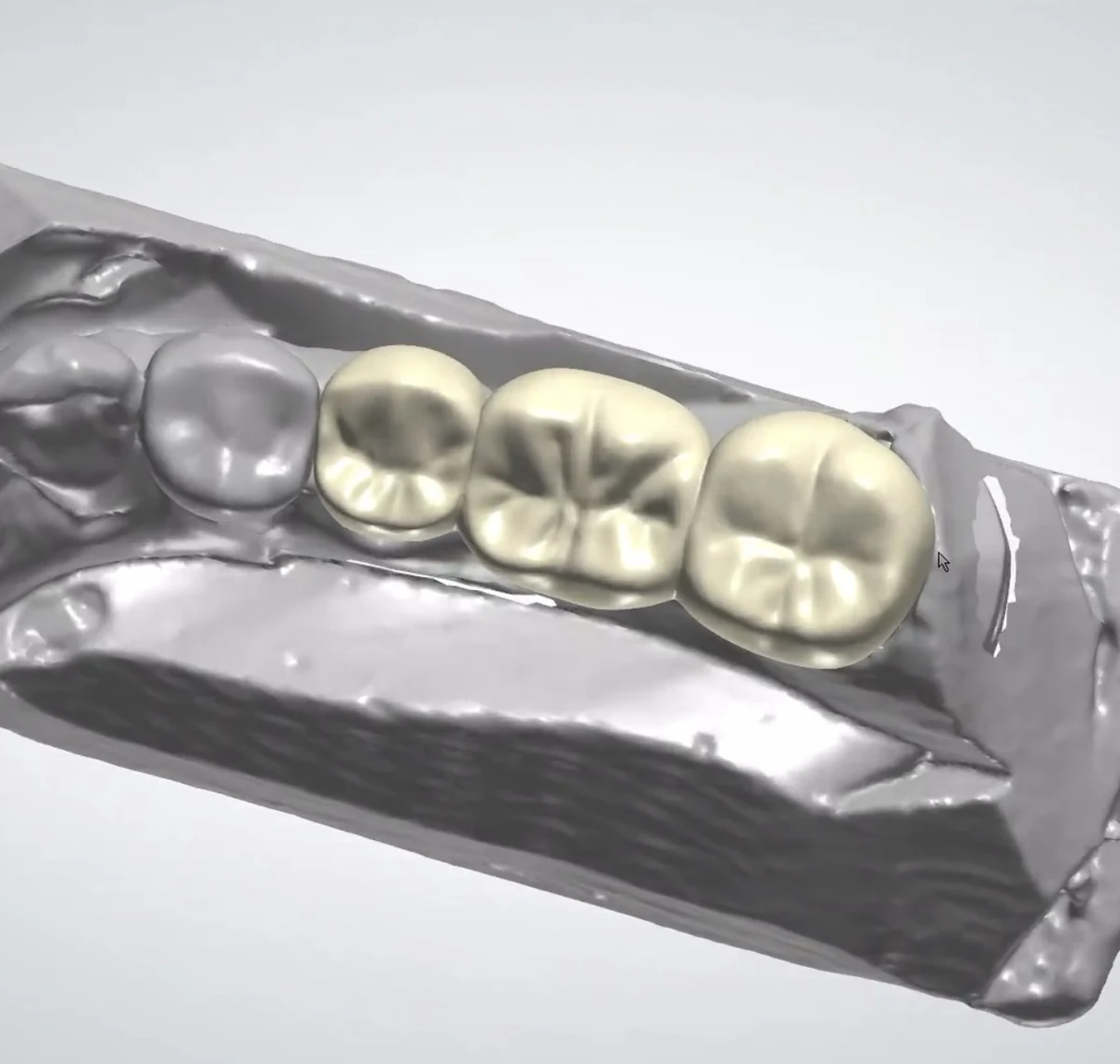
Use actual CAD work to define a review question
The approved posterior multi-unit view illustrates Pristine’s restorative CAD work. It can help a customer explain the design detail they want reviewed; it is not a demonstration that browser-based CEREC supports this depicted multi-unit task or that these files passed through DS Core.
Pristine offers crown-and-bridge design and remote CAD outsourcing in its published 3Shape/exocad workflows. An outside design assignment can be discussed once input, output and receiving requirements are agreed. Pristine DS Core registration, direct local CEREC editing and a returned-file route to a CEREC machine remain unverified.
Compare the original portfolio example, bridge design versus production scope and record checklist before assuming a CAD image proves system interoperability.
Specific validation and useful next step
Louie validation pending — unverified locally. Confirm local CEREC release versus cloud task, region, subscription/export entitlement and Pristine’s actual recipient registration/access. For one authorized training package, identify the available scan/design/native roles and test receiving them in Pristine’s named CAD release. Separately validate any proposed returned output in the practice’s CEREC/manufacturing environment, with the responsible production owner.
Next step: complete the transfer-gates worksheet and the bounded interoperability pilot. Agree revision ownership and delivery acceptance before a real case. If return acceptance is unconfirmed, discuss a supported receiving-lab route instead of promising chairside production. Clinical files are arranged separately from the business inquiry.
Source notes
Current primary pages checked October 7, 2026 UTC. Product statements are attributed; regional/account applicability and Pristine handoffs still require validation. Tables, hypothetical examples and worksheets are original.
- Dentsply Sirona US CEREC: local/cloud design configurations and stages; named 5.3 context, not a latest-version guarantee.
- Dentsply Sirona US DS Core: Advanced table lists CEREC Design STL export; lab registration/region caveat. Prices not reproduced.
- Dentsply Sirona US lab page: download-format scope; not evidence of Pristine registration or a complete native/return path.
Prepared by Pristine Dental Design · October 7, 2026 UTC. Responsible prescriptions, manufacturer instructions and receiving-team approvals govern actual work.