Intended workflow: part of glidewell.io
Glidewell’s current product page places fastdesign.io Software and Design Station inside its glidewell.io in-office workflow. It describes ARI-generated proposals, in-office crown design, case submission and on-screen support from Glidewell experts. These are attributed product functions, not software behavior reproduced by Pristine.
Glidewell’s Chairside article describes three routes: “Send to Mill,” “Send to Lab” and “Send to Design Service.” The third sends scans to Glidewell for a proposal returned for in-office milling. That article describes a vendor service; confirm its current eligibility and terms with Glidewell. No quoted fee or speed is adopted here.
Choose the work to keep in-house
| Route | Design / manufacture decision | Evidence before committing |
|---|---|---|
| In-office design and milling | The practice reviews its proposal and retains local production responsibility. | Demonstrate the exact installed indication, equipment/material route and staff review process. |
| Glidewell design service, in-office milling | Glidewell’s article describes an outside proposal returned to the practice. | Confirm current service entitlement, included records, review/revision process and receiving mill route with Glidewell. |
| Glidewell laboratory fabrication | The vendor article describes sending a case/design to Glidewell for lab manufacture. | Agree the actual prescription, destination, fabrication scope and supplier terms. |
| Independent remote designer such as Pristine | A separate proposed collaboration; design and manufacture must have named owners. | Verify permitted records, receiving CAD task and returned output independently. Direct fastdesign.io access or a fastmill return is unconfirmed. |
Hypothetical practice: its mill has capacity but staff cannot spend time reviewing a posterior crown proposal. Compare a documented vendor design-service route with an independent handoff only after checking the available records and return path. If the bottleneck is fabrication or finalization, outsourcing CAD alone does not resolve it.
File-transfer limits: establish both directions
The fastdesign.io product page reviewed here does not establish a third-party STL export procedure, editable native-project exchange or independent remote-access entitlement. Absence of a documented route is a verification task, not proof that export is impossible.
Ask the supplier to identify the permitted output from the actual installed release. Distinguish scanner acquisition records, a proposed design, an editable project and a manufacturing output. A scanner’s export option does not establish an export from fastdesign.io, and a readable surface does not prove it can be returned to fastmill.io.
| Gate | Concrete check |
|---|---|
| Outbound records | Name preparation/opposing/relationship/reference roles, source versions and legal access; preserve the originals. |
| Receiving design | Receiver opens a permission-cleared training package in the agreed installed CAD release and identifies what can actually be designed or continued. |
| Return route | If practice manufacturing is required, the receiving team tests the proposed returned output and its production review; do not infer acceptance from a download. |
| Held decision | If either direction is unconfirmed, hold the system-specific promise and ask about a separately supported scanner-to-lab workflow. |
Use the interoperability pilot and delivery acceptance stages to record the observed outcome without turning a workaround into a guarantee.
Where Pristine can help and what the portfolio shows
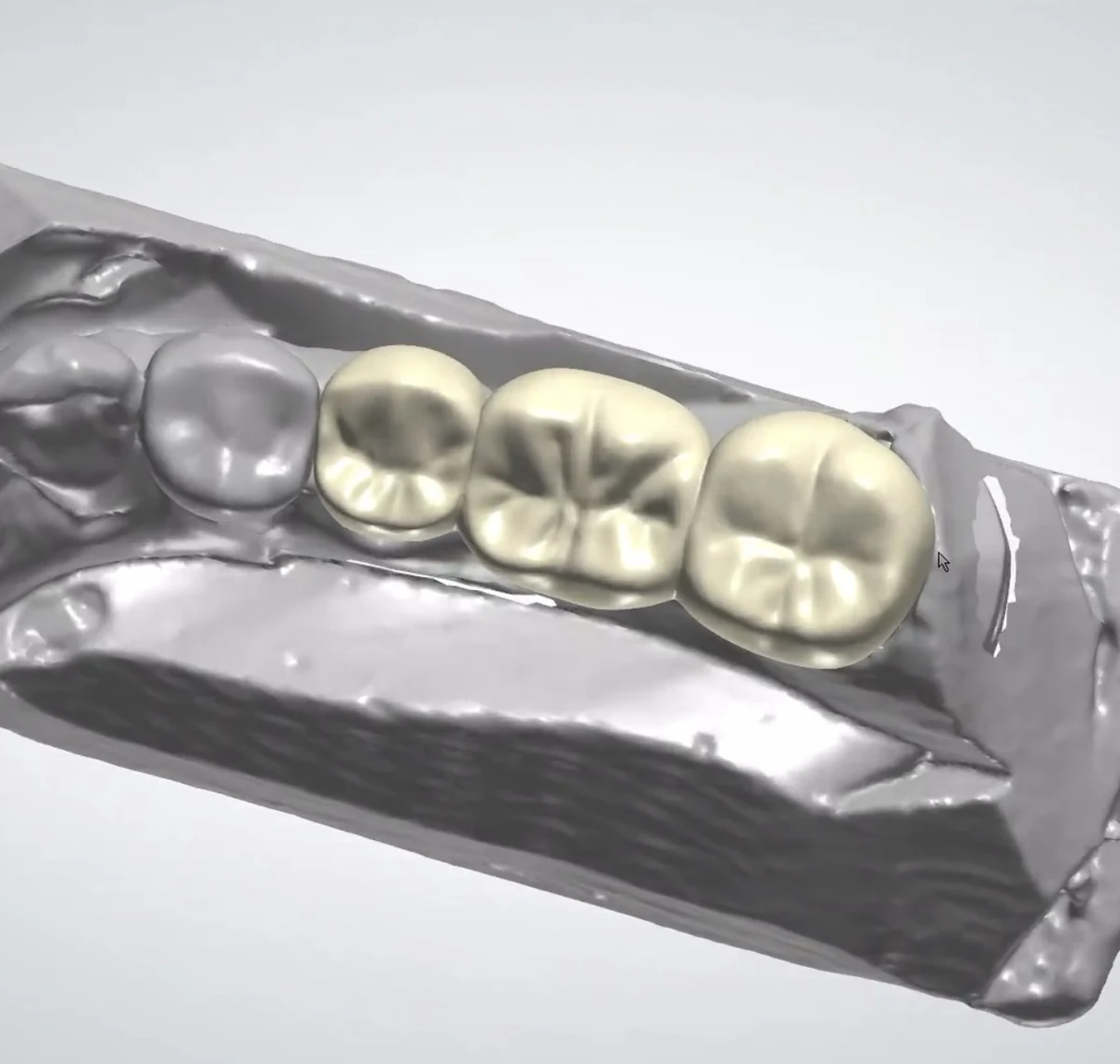
A concrete design-review discussion
This existing posterior CAD view can anchor a discussion about the intended anatomy, record-defined boundaries and the lab’s review brief. It does not identify the originating scanner/software, material, manufacturing settings or clinical result.
Pristine’s confirmed offering is remote restorative CAD design, including crown-and-bridge design, with workflow requirements agreed before work starts. Its published workflow uses 3Shape and exocad. Scope the design task and receiving output first; direct fastdesign.io editing, Glidewell support access and fastmill.io compatibility are not confirmed services.
See the original portfolio view and remote design service. Start with a business discussion of the scanner, installed release, indication and intended receiver; clinical file transfer is arranged separately.
Specific validation and useful next step
Louie validation pending — unverified locally. With the supplier and receiving team, confirm the exact fastdesign.io release/account and whether an independent recipient may obtain the required records; test that package in Pristine’s named 3Shape/exocad version. Separately test any proposed returned design in the intended fastmill.io/manufacturing route. Confirm revision ownership, permitted access and output scope before offering either direction.
Next step: complete the blank route worksheet and the scope agreement for one authorized training task. If export/return rights remain unclear, resolve those with the supplier before sending a real case. No affiliation, supported integration, clinical setting, price or outcome is implied.
Source notes
Current primary pages checked October 7, 2026 UTC. Product statements are attributed; regional/account applicability and Pristine handoffs still require validation. Tables, hypothetical examples and worksheets are original.
Prepared by Pristine Dental Design · October 7, 2026 UTC. Responsible prescriptions, manufacturer instructions and receiving-team approvals govern actual work.